Functions
Dans cette quête, tu vas découvrir ce que sont les fonctions, comment les utiliser en Python et comment en créer toi-même. Tu entendras probablement aussi parler des méthodes (methods), c'est à peu près la même chose qu'une fonction, mais dans un contexte particulier (la POO, programmation orientée objet).
Garde en tête que ce que tu vas apprendre ici n'est pas propre à Python, on le retrouve aussi dans beaucoup d'autres langages.
Objectifs
- Savoir utiliser une fonction,
- Créer tes propres fonctions,
- Gérer le passage d'arguments,
- Contrôler ce qu'une fonction renvoie
Utiliser une fonction
Dans ton travail, tu peux avoir besoin de la même fonctionnalité de façon répétée. Comme connaître la valeur absolue d'un nombre.
Prenons cette variable comme exemple :
num = -9
On souhaite trouver la valeur absolue. Tu pourrais être tenté(e) de coder toi-même la fonctionnalité suivante :
num = -9
if num > 0:
    abs_num = num
else:
    abs_num = - num
print("The absolute value is : ", abs_num)
Et à chaque fois que tu veux obtenir la valeur absolue d'un nombre, tu dois dupliquer le code.
Pour cet exemple très simpliste, tu te dis que copier-coller une simple condition, ce n'est pas si grave. Sauf qu'il existe déjà quelque chose en Python qui te permet d'obtenir le même résultat, bien plus simplement, rapidement et avec de meilleures performances : la fonction abs.
print("Total amount is : ", abs(num) )
Il te suffit d'appeler la fonction abs suivie de 2 parenthèses () à l'intérieur desquelles tu dois préciser ta liste, qu'on appelle argument (ou paramètre).
C'est plus efficace comme ça.

Utiliser une fonction peut grandement alléger ton code en réduisant le nombre de lignes. Imagine le temps que tu peux gagner en utilisant des fonctions qui font des choses plus complexes.
Python possède un grand nombre de fonctions, que tu peux utiliser sans modération. On les appelle les "built-in functions" (fonctions intégrées, livrées d'office avec Python). Tu entendras aussi parler des "standard functions" (fonctions standard). Certaines sont si courantes et utiles que tu les maîtriseras parfaitement. Bien sûr, elles sont bien trop nombreuses pour toutes les faire rentrer dans une tête.

Tu dois en connaître certaines, et avoir une idée de ce que tu peux faire ou non avec les built-in functions de Python. Pour ça, tu as la documentation officielle de Python (voir les ressources plus bas).
Attention, les noms de fonctions sont sensibles à la casse (case sensitive, les majuscules et minuscules comptent) ! Si tu appelles Sum(), Python ne comprendra pas.
Voici ta nouvelle meilleure amie, la documentation officielle de Python ! C'est grâce à elle que tu peux savoir exactement comment utiliser ces fonctions.
Créer tes propres fonctions
D'un côté, Python contient déjà plein de built-in functions que tu peux utiliser au quotidien. Mais de l'autre, tu devras aussi souvent créer tes propres fonctions. Comme vu plus haut, une fonction exécute un ensemble de code prédéfini et peut être appelée quand tu veux. Ça va te permettre de lancer le même algorithme encore et encore sans jamais copier-coller. Comme tu vas vite t'en rendre compte, moins tu copies-colles, plus le code est propre, bien structuré et cohérent. Il sera aussi plus facile de corriger les problèmes.
Le principe de se répéter le moins possible dans son code, c'est le principe du code DRY (Don't Repeat Yourself, ne te répète pas). En programmation, tu vas découvrir qu'il existe de nombreux "courants philosophiques", qui préconisent différentes approches pour produire un code propre, fonctionnel et optimisé. DRY en est un.
Pour la définition d'une fonction (function definition) en Python, tu dois d'abord faire appel au mot-clé def.
Ensuite, donne-lui juste un nom. Tu es libre de l'appeler comme tu veux ! Tant que tu respectes les contraintes imposées par Python, qui sont les mêmes que pour les variables. Pour rappel :
- Un nom de fonction ne peut pas commencer par une valeur numérique,
- Ne doit contenir aucun caractère interdit :
@ou- - Chaque nom doit être unique et ne pas être un nom réservé. Comme
list()oustr()par exemple. (En Python, ce n'est pas vraiment interdit, mais c'est une très mauvaise pratique)
Tu dois aussi penser à la propreté et à la maintenabilité du code. Comme pour le nommage des variables, il est important de bien nommer les fonctions. Un script rempli de toto(), tata(), function1(), function2() et doSomething() ou getStuff() ne sera pas très facile à comprendre.
Utilise des noms cohérents, représentatifs de ce que ça fait, en suivant la syntaxe camelCase recommandée (écriture où les mots sont collés et chaque mot après le premier commence par une majuscule). Par exemple getTotalPrice(price, taxeRate) ou filterSubscribedUsers(users).
Pour définir une fonction appelée myFunction, utilise la structure ci-dessous :
def myFunction(argument):
  return something
Et pour appeler la fonction fraîchement définie, tu dois faire exactement comme pour une built-in function :
myFunction()
Les arguments
Dans le premier chapitre, pour que sum() "fonctionne", tu as dû lui "donner en argument" la liste amounts_list. Le code ne peut pas deviner ce que tu as en tête, tu dois être précis(e).
Essayons de coder une nouvelle fonction pour calculer la valeur absolue d'un nombre :
def myAbs(n):
  if n >= 0:
    abs_num = n
  else:
    abs_num = -n
  print("The absolute value is:",abs_num)
On peut appeler cette fonction pour l'appliquer au paramètre.
myAbs(num)
Tu peux nommer ton argument comme tu préfères. C'est comme une local variable (variable locale, qui n'existe qu'à l'intérieur de ta fonction) présente uniquement dans ta fonction.
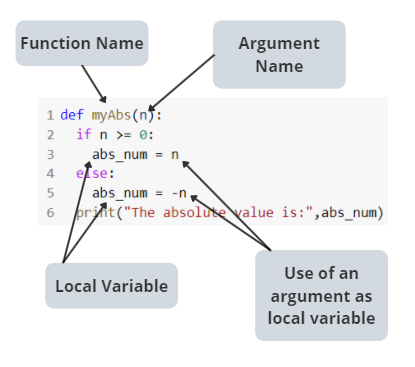 Si j'essaie d'afficher (print) un argument en dehors d'une fonction, tu obtiendras un message d'erreur.
print(n)
NameError: name 'list_argument' is not defined
Comment ça marche pour l'ordinateur ? D'abord il remplace l'argument par la variable, puis la variable par la donnée. Voici ce qui se passe pour le code que tu lances :
- Définition d'une fonction
- Affectation d'une donnée à une variable
- Exécution de la fonction sur la variable
def myAbs(n):
  if n >= 0:
    abs_num = n
  else:
    abs_num = -n
  print("The absolute value is:",abs\_num)

num = -9
myAbs(num)
Mais voici les étapes réellement effectuées par l'ordinateur :
- Définition d'une fonction
myAbs - Affectation de la donnée
-9à une variablenum - Remplacement du nom de la fonction par le script (lignes 3 à 6)
- Remplacement de l'argument
npar la variable globalenum - Remplacement de la variable globale
numpar la donnée-9
Quelle est la différence entre argument et paramètre ?
En général, quand on dit paramètre/argument, on parle de la même chose, mais la principale différence entre les deux, c'est que le paramètre est ce qui est déclaré dans la fonction, tandis qu'un argument est ce qui est passé au moment de l'appel de la fonction.
Les arguments multiples
Le nombre d'arguments est différent pour chaque fonction, selon ce qu'elle fait et les informations dont elle a besoin pour fonctionner.
Essayons de créer une fonction substraction. On a besoin d'un premier nombre, et d'un second nombre à soustraire du premier.
def substraction(nb, nb_to_substract):
  print(nb - nb_to_substract)
Quand une fonction attend plusieurs arguments, c'est l'ordre qui compte.
substraction(12 , 7)
>>> 5
Tu peux préciser les noms des arguments, si tu préfères :
substraction(nb = 12 , nb_to_substract = 7)
>>> 5
C'est le même résultat si on change l'ordre et qu'on précise les noms des arguments :
substraction(nb_to_substract = 7 , nb = 12 )
>>> 5
Mais bien sûr, le résultat est différent si on change l'ordre sans préciser les noms des arguments :
substraction(7 , 12)
>>> -5
Les valeurs de retour
Une fonction devrait rarement afficher un résultat. Même si la plupart du temps l'objectif est d'afficher du contenu à l'utilisateur, à quelques exceptions près tu ne devrais jamais appeler print directement dans une fonction. Hé, mais c'est ce qu'on a fait depuis le début de cette quête ! Oui c'est vrai, mais maintenant c'est fini.
Tu dois désormais utiliser le mot-clé return suivi de la donnée à renvoyer.
C'est-à-dire que, plutôt que d'écrire :
def substraction(nb, nb_to_substract):
  print(nb - nb_to_substract)
Tu dois écrire :
def substraction(nb, nb_to_substract):
  return (nb - nb_to_substract)
Pourquoi vaut-il mieux utiliser return ?
Parce que print est une fonction qui sert à afficher un message à l'écran.
Et return est une commande qui sert à renvoyer, pour que tu puisses réutiliser plus tard le résultat de ta fonction. Par exemple :
def substraction(nb, nb_to_substract):
  print(nb - nb_to_substract)

substraction(10 , 3) + 2
unsupported operand type(s) for +: 'NoneType' and 'int'
On obtient une erreur, parce qu'on dit à l'ordinateur "s'il te plaît affiche quelque chose, et ajoute 2 à cet affichage". Mais un ordinateur ne comprend pas comment ajouter quelque chose à un print.
Avec la syntaxe correcte :
def substraction(nb, nb_to_substract):
  return (nb - nb_to_substract)

substraction(10 , 3) + 2
>>> 9
N'oublie jamais qu'à partir du moment où l'interpréteur rencontre l'instruction return, celui-ci s'arrête là et quitte la fonction. Si jamais tu as du code écrit après un return, il ne sera jamais lu. Normalement, ton IDE (environnement de développement, le logiciel dans lequel tu écris ton code) devrait t'avertir de ce genre d'incohérence. Une erreur courante est de placer un return au milieu d'une boucle. Évidemment, dès la première itération (premier tour), l'interpréteur quitte la boucle et la boucle n'est pas terminée.
Quiz
false|||true|||false
# Une fonction python ne peut traiter que des valeurs numériques :
[x] Faux
[] Vrai
# Seuls les membres de python peuvent créer de nouvelles fonctions :
[x] Faux, tout le monde peut créer de nouvelles fonctions
[] Vrai
# Quelle est la commande pour créer une nouvelle fonction en python ?
[x] def new_function():
[] func new_function():
[] function new_function():
[] definition new_function():
# Une fonction python ne peut avoir qu'1 seul argument :
[x] Faux
[] Vrai
# Quels sont des synonymes ?
[x] Argument et Paramètre
[] Variable et Fonction
[] Variable et Argument
# Quelle est la commande pour renvoyer une valeur à la fin d'une fonction :
[x] return
[] print
[] end
Lis le code ci-dessous, puis réponds au quiz suivant :
def add(first, second):
    new = first + second
    return new

test1 = 3
test2 = 4

add(test1, test2)
false|||true|||false
# "add" est :
[x] une fonction
[] un argument/un paramètre
[] une variable
[] pourrait être considéré comme une variable locale
# "first" est :
[] une fonction
[x] un argument/un paramètre
[] une variable
[x] pourrait être considéré comme une variable locale
# "new" est :
[] une fonction
[] un argument/un paramètre
[] une variable
[x] une variable locale
# "test1" est :
[] une variable locale
[x] une variable globale
[] une fonction
[] un argument
Ressources
Défi
Il fait beau, le soleil brille, les oiseaux chantent. Tu aperçois un groupe de statisticiens qui marchent d'un pas décidé vers ton bureau. Ils ont l'air abattus. Que leur est-il arrivé ?
Quel est leur problème ? Ils veulent apprendre à programmer en Python. Ils suivent un cours en ligne mais ils galèrent depuis le début.
Tu décides gentiment de les aider. Mais avant de te faire confiance aveuglément, ils décident de te lancer un défi qui consiste à réaliser toutes les missions contenues dans ce notebook : Helping Statisticians with Functions
Tu devras créer une copie du notebook et compléter les missions qu'il contient.
Ensuite, poste le lien de ton notebook Google Colaboratory comme solution.
Critères de validation
- Le fichier lié est consultable et lisible.
- Toutes les missions sont correctement codées et testées.
In this quest you will discover what functions are, how to use them in Python and how to create them yourself. You will also probably hear about methods, it's pretty the same as a function, but in a particular context (OOP).
Keep in mind that what you will learn here is not unique to Python, and it is also found in many other languages.
Objectives
- Know how to use a function,
- Create your own functions,
- Manage argument passing,
- Control what a function returns
Use a function
In your job, you may need the same functionality repeatedly. Like knowing the absolute value of a number.
Let's consider this variable as an example :
num = -9
We wish to find the absolute value. You might be tempted to code the following feature yourself:
num = -9
if num > 0:
    abs_num = num
else:
    abs_num = - num
print("The absolute value is : ", abs_num)
And every time you want to have the absolute value of a number, you have to duplicate the code.
For this very simplistic example, you tell yourself that copying and pasting a simple condition is not bad. Except that there is already something in Python that allows you to get the same result, much more simply, quickly, and with better performance: the abs function.
print("Total amount is : ", abs(num) )
Just call the function abs followed by 2 brackets()within which, you must specify your list which is called argument (or parameter).
It's more efficient that way.
Using a function can greatly lighten your code by reducing the number of lines. Imagine how much time you can save by using functions that do more complex things.
Python has a large number of functions, which you can use and abuse. They are called "built-in functions". You'll also hear about "standard functions". Some are so common and useful that you will master them perfectly. Of course, there are too many to fit all of them into one's head.
You need to know some of them, and have an idea of what you can and cannot do with Python's built-in functions. For this, you have the official Python documentation (see resources below).
Please note that function names are case sensitive! If you call Sum() Python won't understand.
Here is your new best friend, the official Python documentation! It's thanks to it that you can know exactly how to use those functions.
Create your own functions
On the one side, Python already contains lots of built-in functions that you can use on a daily basis. But on the other side, you'll also often have to create your own functions. As seen above, a function performs a predetermined set of code and can be called whenever you want. This will allow you to run the same algorithm over and over again without ever copying and pasting. As you'll soon find out, the less you copy and paste, the more clean, well-structured and consistent the code will be. It will also be easier to fix the issues.
The principle of repeating itself as little as possible in its code is the principle of the DRY code (Don't Repeat Yourself). In programming, you will discover that there are many "philosophical currents", advocating different approaches to produce clean, functional and optimized code. DRY is one of them.
For function definition in Python, you must first call upon the key word def.
Then just give it a name. You're free to call it whatever you want! As long as you respect the constraints imposed by Python, which are the same as for variables. As a reminder:
- A function name cannot begin with a numeric value,
- Must not contain any prohibited characters :
@or- - Each name must be unique and not a reserved name. Like
list()orstr()for example. (In Python, it's not really prohibited, but it's a very bad practice)
You must also think about the cleanliness and maintainability of the code. As with naming variables, it is important to name the functions properly. A script full of toto(), tata(), function1(), function2() and doSomething() or getStuff() will not be very easy to understand.
Use consistent names, representative of what it does, and using the recommended camelCase syntax. For example getTotalPrice(price, taxeRate) or filterSubscribedUsers(users).
To define a function called myFunction use the structure below:
def myFunction(argument):
  return something
And to call the function, freshly defined, you have to do exactly as for a built-in function:
myFunction()
The arguments
In the first chapter, in order for the sum() "works", you had to "argument", the list amounts_list. The code can't guess what's on your mind, you have to give it specifics.
Let's try to code a new function to calculate the absolute of a number:
def myAbs(n):
  if n >= 0:
    abs_num = n
  else:
    abs_num = -n
  print("The absolute value is:",abs_num)
We can call this function to apply it to the parameter.
myAbs(num)
You can name your argument as you prefer. It's like a local variable present only inside your function.
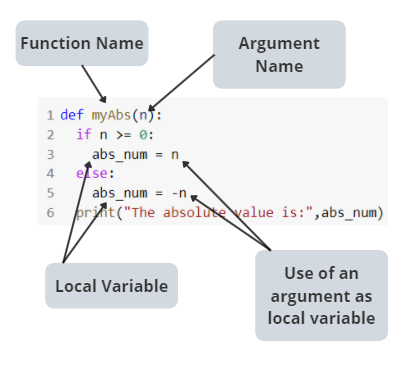 If I try to print an argument outside a function, you'll get an error message.
print(n)
NameError: name 'list_argument' is not defined
How does it work for the computer? First it replaces the argument by the variable, then the variable by the data. Here is what happens for the code that you launch:
- Definition of a function
- Assignment of data to a variable
- Execution of the function on the variable
def myAbs(n):
  if n >= 0:
    abs_num = n
  else:
    abs_num = -n
  print("The absolute value is:",abs\_num)

num = -9
myAbs(num)
But here are the steps really performed by the computer:
- Definition of a function
myAbs - Assignment of data
-9to a variablenum - Replacement of the function's name by the script (lines 3 to 6)
- Replacement of the argument
nby the global variablenum - Replacement of the global variable
numby the data-9
What's the difference between argument and parameter?
Generally when people say parameter/argument they mean the same thing, but the main difference between them is that the parameter is what is declared in the function, while an argument is what is passed through when calling the function.
Multiple arguments
The number of arguments is different for each function, depending on what it does, and the information it needs to run.
Let's try to create a substraction function. We need a first number, and a second number to be subtracted from the first.
def substraction(nb, nb_to_substract):
  print(nb - nb_to_substract)
When a function is waiting for several arguments, it is order that matters.
substraction(12 , 7)
>>> 5
You can precise the argument names, if you prefer:
substraction(nb = 12 , nb_to_substract = 7)
>>> 5
It's the same result if we change the order and we precise the argument names:
substraction(nb_to_substract = 7 , nb = 12 )
>>> 5
But of course, result is different if we change the order without argument names:
substraction(7 , 12)
>>> -5
Return values
A function should rarely display a result. Even if most of the time, the goal is to display content to the user, with some exceptions you should never call print directly into a function. Hey, but it's what we did from the beginning of this quest! Yes it's true, but now it's over.
You must now use the keyword return followed by the data to be returned.
That is, rather than writing:
def substraction(nb, nb_to_substract):
  print(nb - nb_to_substract)
You must write:
def substraction(nb, nb_to_substract):
  return (nb - nb_to_substract)
Why it's better to use return?
Because print is a function to display a message on your screen.
And return is a command to return, so you can use later the result of your function. For example :
def substraction(nb, nb_to_substract):
  print(nb - nb_to_substract)

substraction(10 , 3) + 2
unsupported operand type(s) for +: 'NoneType' and 'int'
We got an error, because we say to the computer "please print something, and add 2 to this print" But a computer doesn't understand how to add something to a print.
With the correct syntax:
def substraction(nb, nb_to_substract):
  return (nb - nb_to_substract)

substraction(10 , 3) + 2
>>> 9
Never forget that from the moment the interpreter meets the instruction return this one will end there and get out of office. If you ever have code written after a return it will never be read. Normally, your IDE should warn you about this kind of inconsistency. A common mistake is to place a return in the middle of a loop. Obviously, from the first iteration (first round), the performer leaves the loop and the loop is not completed.
Quiz
false|||true|||false
# A python' function can only process numeric values:
[x] False
[] True
# Only python staff can create new functions:
[x] False, everyone can create new functions
[] True
# What is the command to create a new function in python?
[x] def new_function():
[] func new_function():
[] function new_function():
[] definition new_function():
# A python' function can only have 1 argument:
[x] False
[] True
# What is synonym?
[x] Argument and Parameter
[] Variable and Function
[] Variable and Argument
# What is the command to return a value at the end of a function:
[x] return
[] print
[] end
Read the code below, then answer the following quiz:
def add(first, second):
    new = first + second
    return new

test1 = 3
test2 = 4

add(test1, test2)
false|||true|||false
# "add" is:
[x] a function
[] an argument/a parameter
[] a variable
[] could be consider as a local variable
# "first" is:
[] a function
[x] an argument/a parameter
[] a variable
[x] could be consider as a local variable
# "new" is:
[] a function
[] an argument/a parameter
[] a variable
[x] a local variable
# "test1" is:
[] a local variable
[x] a global variable
[] a function
[] an argument
Resources
Challenge
The weather is nice, the sun is shining, the birds are chirping. You spot a group of fellow statisticians walking purposefully towards your office. They look beaten down. What happened to them?
What is their problem? They want to learn how to program in Python. They are taking an online course but they have struggled from the beginning.
You kindly decide to help them. But before trusting you blindly, they decide to give you a challenge which consists of carrying out all the missions contained in this notebook: Helping Statisticians with Functions
You will need to create a copy of the notebook and complete the missions it contains.
Then post the link to your Google Colaboratory notebook as a solution.
Validation criterias
- The linked file is searchable and readable.
- All missions are correctly coded and tested.
Ressources partagées sur cette quête
- Helps with last missionhttps://prepinsta.com/python/swap-two-variables-using-function/