✏️ Exercise 5 - Loops
Introduction

⚠️ Avant de commencer cette quête, tu dois avoir terminé les quêtes suivantes :
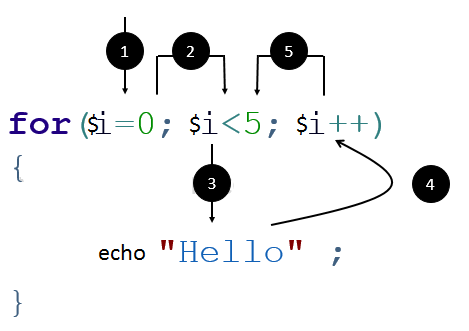
Rappel : Une boucle (loop, instruction qui répète du code plusieurs fois) permet de répéter une instruction un certain nombre de fois, selon une condition.
- Initialisation d'un compteur
- Vérifie si la condition est toujours vraie
- Si oui, exécute le code entre les accolades. Sinon la boucle se termine et les étapes suivantes sont ignorées.
- Met à jour la valeur du compteur
- Retourne à l'étape 2 (tant que la condition est vraie)
Source : hexainclude
💪 Challenge
Astuce :
Tu peux exécuter ton script directement dans ton terminal avec php myScript.php. Pour afficher un saut de ligne et améliorer la lisibilité, utilise la constante PHP PHP_EOL (EOL = End Of Line, fin de ligne).
par exemple echo 'hello' . PHP_EOL; affichera la chaîne 'hello' et ajoutera une nouvelle ligne dans ta console.
Exercice 1 : planter des arbres 🌳
- Écris une boucle pour planter 3 arbres (tu dois afficher '🌳🌳🌳').
- Écris une boucle pour planter 8 🌳 .
- Écris une boucle pour planter 20 🌳 .
Exercice 2 : planter plus d'arbres 🌲🌴
Dans l'exercice précédent, tu peux planter un 🌳 par heure. Donc dans une boucle de 8, tu plantes 8 🌳, facile. Maintenant, tu dois planter des 🌲, ils sont plus délicats et nécessitent de creuser plus profond. Il te faut 2 heures pour planter un 🌲.
Astuce : tu ne devrais pas calculer à l'avance le nombre d'arbres plantés mais laisser la boucle le faire pour toi. Probablement en utilisant un compteur $numberOfHours
- Écris une boucle pour planter des 🌲 pendant une journée de travail de 6 heures.
- Écris une boucle pour planter des 🌲 pendant une journée de travail de 8 heures.
- Écris une boucle pour planter des 🌲 pendant une journée de travail de 9 heures.
Tu as maintenant de l'expérience dans la plantation d'arbres. Tu travailles désormais avec des arbres très délicats et rares 🌴. Il te faut 3 heures de travail pour planter un 🌴.
- Écris une boucle pour planter des 🌴 pendant une journée de travail de 6 heures.
- Écris une boucle pour planter des 🌴 pendant une journée de travail de 2 heures.
- Écris une boucle pour planter des 🌴 pendant une journée de travail de 8 heures.
Exercice 3 : planter une forêt
Tu sais planter une rangée d'arbres 🌳🌳🌳🌳🌳🌳🌳🌳🌳. Mais tu vois plus grand, et tu veux maintenant planter une forêt entière.
-
En utilisant 2 boucles imbriquées (nested, une boucle placée à l'intérieur d'une autre) (oui, tu peux utiliser une boucle dans une autre boucle, c'est fou !), affiche une forêt de 8 colonnes et 3 rangées. Utilise
PHP_EOLpour créer de nouvelles lignes. Tu dois obtenir 🌳🌳🌳🌳🌳🌳🌳🌳 🌳🌳🌳🌳🌳🌳🌳🌳 🌳🌳🌳🌳🌳🌳🌳🌳 -
Plus grand maintenant ! Affiche une forêt de 40 colonnes et 25 rangées. Tu peux aussi utiliser 2 variables pour déterminer la largeur et la hauteur de la forêt. Les boucles doivent refléter les valeurs de ces variables.
-
Crée une forêt de 10 colonnes et 5 rangées, avec des types d'arbres alternés dans chaque rangée, comme ci-dessous. (Astuce : utilise l'opérateur modulo % pour déterminer si tu as une valeur paire ou impaire)
🌳🌳🌳🌳🌳🌳🌳🌳🌳🌳 🌲🌲🌲🌲🌲🌲🌲🌲🌲🌲 🌳🌳🌳🌳🌳🌳🌳🌳🌳🌳 🌲🌲🌲🌲🌲🌲🌲🌲🌲🌲 🌳🌳🌳🌳🌳🌳🌳🌳🌳🌳
- Crée une forêt de 7 colonnes et 8 rangées, avec des types d'arbres alternés dans chaque colonne 🌳🌲🌳🌲🌳🌲🌳 🌳🌲🌳🌲🌳🌲🌳 🌳🌲🌳🌲🌳🌲🌳 🌳🌲🌳🌲🌳🌲🌳 🌳🌲🌳🌲🌳🌲🌳 🌳🌲🌳🌲🌳🌲🌳 🌳🌲🌳🌲🌳🌲🌳 🌳🌲🌳🌲🌳🌲🌳
Exercice 4 : planter une forêt en triangle
Tu ne peux pas toujours planter une forêt de forme rectangulaire.
-
Crée des boucles pour afficher cette forêt en forme de triangle (un 🌳 de plus à chaque nouvelle ligne). 🌳 🌳🌳 🌳🌳🌳 🌳🌳🌳🌳 🌳🌳🌳🌳🌳
-
Crée des boucles pour afficher cette autre forêt en forme de triangle (de la ligne la plus longue à la plus courte). 🌳🌳🌳🌳🌳 🌳🌳🌳🌳 🌳🌳🌳 🌳🌳 🌳
🧐 Critères d'acceptation
- [ ] Tous les arbres sont correctement affichés
- [ ] Tu as compris comment utiliser des boucles simples
- [ ] Tu as compris comment imbriquer deux boucles pour résoudre des problèmes plus complexes.
Introduction

⚠️ Before starting this quest, you must have finished the following quests:
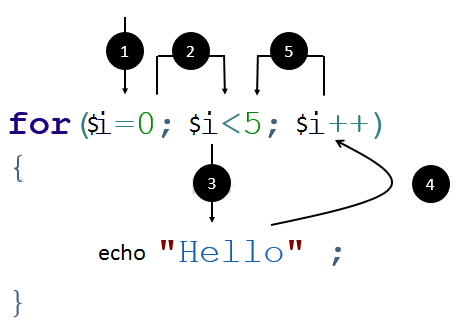
Reminder : A loop allows to repeat an instruction a number of times, according to a condition.
- Initialization of a counter
- Check if condition is still true
- If so, execute the code inside curly brackets. Else the loop ends and following steps are skipped.
- Update value of counter
- Restart to step 2 (while condition is true)
Source: hexainclude
💪 Challenge
Hint:
You can execute your script directly in your terminal using php myScript.php. To display a line break and improve readability, use the PHP constant PHP_EOL (EOL = End Of Line).
e.g. echo 'hello' . PHP_EOL; will display the 'hello' string and add a new line in your console.
Exercise 1 : planting trees 🌳
- Write a loop to plant 3 trees (you should display '🌳🌳🌳').
- Write a loop to plant 8 🌳 .
- Write a loop to plant 20 🌳 .
Exercise 2 : planting more trees 🌲🌴
In previous exercise, you can plant one 🌳 per hour. So in a loop of 8, you plant 8 🌳, easy. Now, you have to plant 🌲, they are more delicate and need to dig deeper. You need 2 hours to plant a 🌲.
Hint: you shouldn't calculate the amount of trees planted before but have the loop do it for you. Probably using a $numberOfHours counter
- Write a loop to plant 🌲 during a 6 hours working day.
- Write a loop to plant 🌲 during a 8 hours working day.
- Write a loop to plant 🌲 during a 9 hours working day.
You have now experience in tree planting. You work now with very delicate and rare tree 🌴. You need 3 hours of work to plant one 🌴.
- Write a loop to plant 🌴 during a 6 hours working day.
- Write a loop to plant 🌴 during a 2 hours working day.
- Write a loop to plant 🌴 during a 8 hours working day.
Exercise 3 : planting a forest
You know how to plant a row of trees 🌳🌳🌳🌳🌳🌳🌳🌳🌳. But you see bigger, and you want now to plant a whole forest.
-
Using 2 nested loops (yes, you can use a loop inside another loop, it's crazy!), display a forest of 8 columns and 3 rows. Use
PHP_EOLto create new lines. You should obtain 🌳🌳🌳🌳🌳🌳🌳🌳 🌳🌳🌳🌳🌳🌳🌳🌳 🌳🌳🌳🌳🌳🌳🌳🌳 -
Bigger now ! Display a forest of 40 columns and 25 rows. You can also use 2 variables to determine the forest width and height. The loops should reflect the values of these variables.
-
Create a forest of 10 columns and 5 rows, with alternate types of trees in each row, as below. (Hint: use modulo operator % to determine if you have a odd or even value)
🌳🌳🌳🌳🌳🌳🌳🌳🌳🌳 🌲🌲🌲🌲🌲🌲🌲🌲🌲🌲 🌳🌳🌳🌳🌳🌳🌳🌳🌳🌳 🌲🌲🌲🌲🌲🌲🌲🌲🌲🌲 🌳🌳🌳🌳🌳🌳🌳🌳🌳🌳
- Create a forest of 7 columns and 8 rows, with alternate types of trees in each column 🌳🌲🌳🌲🌳🌲🌳 🌳🌲🌳🌲🌳🌲🌳 🌳🌲🌳🌲🌳🌲🌳 🌳🌲🌳🌲🌳🌲🌳 🌳🌲🌳🌲🌳🌲🌳 🌳🌲🌳🌲🌳🌲🌳 🌳🌲🌳🌲🌳🌲🌳 🌳🌲🌳🌲🌳🌲🌳
Exercise 4 : planting triangle forest
You can not always plant rectangle shape forest.
-
Create loops to display this triangle shape forest (one more 🌳 in each new line). 🌳 🌳🌳 🌳🌳🌳 🌳🌳🌳🌳 🌳🌳🌳🌳🌳
-
Create loops to display this other triangle shape forest (from largest to shortest line). 🌳🌳🌳🌳🌳 🌳🌳🌳🌳 🌳🌳🌳 🌳🌳 🌳
🧐 Acceptance criteria
- [ ] All the trees are correctly displayed
- [ ] You have understand how to use simple loops
- [ ] You have understand how to nest two loops to solve more complex problems.