Java Reskilling 01: Introduction to Object-Oriented Programming
Introduction à la programmation orientée objet
Dans les quêtes sur la programmation orientée objet (OOP en anglais, pour object-oriented programming) tu vas apprendre les concepts de l'OOP, les bases de Java, le SDK Java (the Java SDK, le kit de développement Java) et l'utilisation des bibliothèques standard de Java (Java Standard Libraries) avec des exemples tirés du domaine de notre application exemple Tariff-Manager.
Dans cette introduction à l'OOP, nous allons modéliser les clients de notre application web Tariff-Manager en Java.

👀 Introduction
Tu te demandes probablement ce qu'on entend exactement par objet quand on parle de langages de programmation.
Le paradigme de la programmation orientée objet est construit autour de la notion d'objets. Souvent, ce sont des représentations d'objets de la vie réelle (par exemple des clients, des voitures ou des canards), mais un objet peut aussi désigner un concept abstrait (par exemple des chaînes de caractères). Un objet peut avoir à la fois des états et des comportements :
- Un client peut avoir les attributs suivants : un nom, une date de naissance et un indicateur d'activité dans le système ou inactif... Et les comportements suivants : acheter, retourner, s'inscrire...
- Une voiture peut avoir les attributs suivants : sa marque, sa plaque d'immatriculation, son kilométrage.... Et les comportements suivants : rouler, freiner, klaxonner...
- Un canard peut avoir les attributs suivants : son âge, son sexe, son nombre de plumes... Et les comportements suivants : nager, cancaner, dormir...
- Une chaîne de caractères peut avoir les attributs suivants : son contenu (les caractères), sa longueur... Et les comportements suivants : extraire une sous-chaîne, récupérer un caractère à une certaine position...
Dans cette quête, tu vas découvrir comment créer et utiliser des objets en Java !
🤓 À la fin de cette quête, tu sauras :
✅Comprendre les concepts de base de la programmation orientée objet (OOP) : les classes, les objets, les instances, l'état et le comportement des objets ✅Savoir implémenter les concepts de base de l'OOP dans le langage Java : les classes, les constructeurs, les méthodes, les attributs et les modificateurs de visibilité ✅Être capable d'implémenter des solutions métier avec de simples graphes de classes et d'objets en Java
📖Contenu de la quête
- Les classes et les attributs
- Les constructeurs, les instances et les références
- Getter et setter
- Les méthodes
👉Les classes et les attributs
La classe
En Java, tous les objets sont des instances d'une classe.
Prenons l'exemple d'un client : sa classe, pour le moment, est vide et ressemblera à ceci :
public class Customer {

}
L'attribut
Un objet est défini par ses états : en Java, on les appelle des attributs.
Un attribut ressemble à ceci :
visibility type attributeName
Si tu reprends l'exemple du client, ses états pourraient ressembler à ceci :
public class Customer {

    // visibility: private, type: String, attributeName: name
    private String name;

    // visibility: private, type: LocalDate, attributeName: birthdate
    private LocalDate birthdate;

    // visibility: private, type: boolean, attributeName: active
    private boolean active;

}
Pour l'instant, ne prête pas trop attention au mot private. Tu verras plus loin dans la quête pourquoi tu dois l'utiliser.
👉Les constructeurs, les instances et les références
Le constructeur explicite
Dans le cas de la classe Customer, ce serait bien d'initialiser le name et la birthdate du client au moment où tu crées le nouvel objet.
Heureusement, tu peux appeler explicitement un constructeur qui va initialiser les attributs d'un objet.
Tu peux empiler plusieurs constructeurs, chacun initialisant des attributs différents au moment de la création d'un objet.
public class Customer {

    private String name;
    private LocalDate birthdate;
    private boolean active;

    public Customer(String name) {
        this.name = name;
        this.active = true;
        // birthdate is set to null on object creation
    }

    public Customer(String name, LocalDate birthdate) {
        this.name = name;
        this.age = birthdate;
        this.active = true;
    }
}
Le mot-clé this est utilisé par un objet pour cibler l'un de ses propres attributs et méthodes.
Dans l'exemple précédent, this.birthdate appellera l'attribut birthdate de l'objet de la classe Customer.
Cela permet de distinguer l'argument birthdate et l'attribut this.birthdate, qui auraient le même nom.
Le constructeur vide
Pour construire un objet, tu auras besoin d'ajouter un constructeur. C'est lui qui va initialiser ton objet.
Un constructeur doit avoir le même nom que ta classe, et se définit comme suit :
public class Customer() {
}
Il est possible, comme dans l'exemple ci-dessus, de créer un constructeur vide. Cependant, note bien que, si aucun constructeur n'est défini dans ta classe, elle aura par défaut un constructeur vide.
Avec un constructeur vide, les attributs ne se verront pas attribuer de valeur au moment de l'initialisation de l'objet et auront des valeurs par défaut qui dépendent du type de l'attribut (par exemple false pour un boolean)
L'instance
Quand on initialise un objet avec une classe donnée, on dit qu'on a créé une nouvelle instance d'une classe.
Par exemple, tu pourrais dire que tu veux créer une nouvelle instance de la classe
Customer.
Le concept de « nouvelle instance » se traduit syntaxiquement par l'utilisation du mot-clé new. L'instance est créée en appelant le constructeur.
Quand tu crées une instance d'une classe, les attributs renseignés dans le constructeur prendront les valeurs correspondantes et les enregistreront en mémoire :
new Customer("Jane");

// LocalDate.parse("06/09/1934") will return a LocalDate
// object representing the date string "06/09/1934"
new Customer("Joe", LocalDate.parse("06/09/1934"));

La référence
Pour pouvoir accéder à une instance depuis la mémoire, tu dois t'y relier : ce lien s'appelle une référence.
En Java, imagine que c'est comme assigner l'instance à une variable, qui va déterminer le type de classe de l'objet. Voici un exemple :
Customer joe = new Customer("Joe", LocalDate.parse("06/09/1934"));

Ici, joe est la référence de cette instance de la classe Customer.
Comme une instance est stockée en mémoire, il est possible d'avoir plusieurs références qui pointent vers la même instance :
Customer joe = new Customer("Joe", LocalDate.parse("06/09/1934"))
Customer mrX = joe;

Ici, joe et mrX représentent deux références qui pointent vers la même instance. Autrement dit, si l'une des deux est modifiée, l'autre changera aussi !
👉Getter et setter
Le getter
Après avoir créé une instance d'un objet, il peut être utile de récupérer la valeur de l'un de ses attributs.
Créons un nouveau client nommé « AverageJoe » en utilisant le constructeur Customer(String name, LocalDate birthdate), et initialisons son attribut birthdate à la valeur aujourd'hui moins 23 ans.
Customer averageJoe = new Customer("AverageJoe", LocalDate.now().minusYears(23));
Si tu veux récupérer la valeur de son attribut birthdate, tu devras accéder à son attribut.
Tu pourrais être tenté de le récupérer en tapant ceci :
Customer averageJoe = new Customer("Joe", LocalDate.now().minusYears(23));
// returns an error: age has private access in Customer
LocalDate birthdate = averageJoe.birthdate;
Par convention, les attributs devraient avoir une accessibilité private. Ce qui signifie qu'il est impossible de les modifier depuis l'extérieur de la classe !
Une classe, c'est un peu comme une personne. Si tu veux connaître son nom, tu vas devoir lui demander, tu ne vas pas fouiller dans son cerveau pour trouver cette information !
C'est la classe qui est responsable du partage et de la mise à jour de l'état de ses attributs.
Cela veut dire qu'on doit créer des getters (accesseurs, méthodes qui permettent de lire la valeur d'un attribut) pour chaque attribut auquel la classe doit autoriser l'accès. Un getter ressemble à ceci :
public typeAttribute getAttribute() {
    return this.attribute;
}
Dans ce cas, il est possible de récupérer la birthdate en utilisant le getter suivant :
public LocalDate getBirthdate() {
    return this.birthdate;
}
Ensuite, il suffit d'appeler le getter comme ceci :
Customer joe = new Customer("Joe", LocalDate.now().minusYears(23));
LocalDate birthdate = joe.getBirthdate();

Règles particulières pour nommer les getters de type boolean
Si l'attribut est un boolean, ne nomme pas l'accesseur getAttribute. Nomme-le plutôt isAttribute :
public boolean isActive() {
    return this.active;
}
Le setter
De la même manière, si tu veux modifier un attribut, tu ne pourras pas faire ceci :
Customer jane = new Customer("Jane");
// error: birthdate has private access in Customer
jane.birthdate = LocalDate.now().minusYears(29);
À la place, tu devras définir des setters (mutateurs, méthodes qui permettent de modifier la valeur d'un attribut) comme ceci :
public void setAttribute(typeAttribute attribute) {
    this.attribute = attribute;
}
Remarque l'utilisation du type
voidpour la méthode ci-dessus. Le setter va modifier l'état de l'attribut, mais il ne renvoie aucun résultat !

Dans ce cas, pour modifier l'attribut birthdate, écris ceci :
public void setBirthdate(LocalDate birthdate) {
    this.birthdate = birthdate;
}
Il est maintenant possible de modifier cet attribut en utilisant ceci :
Customer jane = new Customer("Jane", LocalDate.now().minusYears(30));
jane.setBirthdate(LocalDate.now().minusYears(29));
🔬Exercice
Crée une classe Administrator qui doit représenter un administrateur système d'une application web.
Un administrateur doit avoir ces propriétés :
namede typeStringemailde typeStringactivede typeboolean
Étapes
- Implémente
name,emailetactivecomme attributs privés de la nouvelle classeAdministrator. - Implémente un constructeur pour
nameetemail, qui affecte aux attributs les valeurs des paramètres et metactiveà false. - Implémente un autre constructeur qui prend les trois attributs en paramètres et affecte aux attributs les valeurs des paramètres.
- Implémente les getters et les setters pour tous les attributs, remarque le modèle différent pour les types
boolean.
See solution|||java|||Reveal class Administrator with all Attributes, Constrcutors, Getters, and Setters|||0|||Hide solution
public class Administrator {

    private String name;
    private String email;
    private boolean active;

    public Administrator(String name, String email) {
        this.name = name;
        this.email = email;
    }

    public Administrator(String name, String email, boolean active) {
        this.name = name;
        this.email = email;
        this.active = active;
    }

    public String getName() {
        return name;
    }

    public void setName(String name) {
        this.name = name;
    }

    public String getEmail() {
        return email;
    }

    public void setEmail(String email) {
        this.email = email;
    }

    public boolean isActive() {
        return active;
    }

    public void setActive(boolean active) {
        this.active = active;
    }

}
👉Les méthodes
Ton objet contient des états et des moyens d'y accéder et de les modifier. Cependant, un objet peut aussi avoir des comportements. En Java, on les appelle des méthodes.
Les méthodes d'instance
Une méthode va te permettre de réaliser des actions et de renvoyer le résultat. Une méthode s'exécute sur l'instance d'une classe, et son résultat variera selon l'objet sur lequel elle est exécutée.
Tu sais déjà écrire tes propres méthodes et tu as même eu l'occasion de les voir en action avec les getters et les setters. Cependant, un exemple de plus ne te fera pas de mal :
    public String nameAndAge() {
        return "My name is" + this.getName() + " and I'm " + String.valueOf(this.getAge());
    }
La méthode est appelée sur l'instance de l'objet, c'est-à-dire :
    Customer jane = new Customer("Jane");
    jane.buy("CrazyBlueDress"); // My name is Jane and I'm buying the CrazyBlueDress.
🔬Exercice
Étends la classe Administrator avec une méthode checkIfActive() qui renvoie une String I am NAME and I am currently ACTIVE où NAME est l'attribut name et ACTIVE est l'attribut active.
See solution|||java|||Reveal class Administrator with the method checkIfActive()|||0|||Hide solution
public class Administrator {

    // omitted the attributes, getters, setters, and constructors here for brevity.

    // possible if-then-else solution
    public String checkIfActive() {
        if (this.active) {
            return "I am " + this.name + " and I am currently active";
        } else {
            return "I am " + this.name + " and I am currently inactive";
        }
    }


    // shorter solution with ternary operator
    public String checkIfActive() {
        return "I am " + this.name + " and I am currently " + ((this.active) ? "active" : "inactive");
    }

}
La méthode statique
Tu as déjà eu l'occasion d'utiliser une méthode main(), donc tu as peut-être remarqué le mot-clé static. Il te permet d'indiquer que ta méthode doit être appelée directement sur une classe, et non sur l'instance d'une classe.
Une méthode statique ne te permet pas de récupérer l'état de ton objet. Autrement dit, il te sera impossible d'afficher ou de modifier les attributs de la classe à l'aide d'une méthode statique.
public static String sayWhatYouAre() {
    return "I am a Customer, I am King!";
}
Tu peux appeler la méthode sur la classe :
Customer.sayWhatYouAre(); // King!
Une méthode statique est utile si un seul comportement s'applique à tous les objets d'une classe.
☝️Résumé
Dans cette quête, tu as appris à...
- Créer une instance de classe
- Créer une référence vers cette instance
- Récupérer un attribut avec un getter
- Modifier l'état d'un attribut avec un setter
- Appeler une méthode sur une instance d'une classe
- Appeler une méthode statique sur la classe
- Référencer deux fois la même instance, et comprendre l'impact de la modification de la seconde
💪Challenge
Ce sera un challenge sous forme de quiz.
Références
- Photo de Michael Dziedzic sur Unsplash
Introduction to Object-Oriented Programming
In the quests about Object-Oriented Programming (OOP) you will learn concepts of OOP, Java basics, the Java SDK, and using the Java Standard Libraries with examples from the domain of our sample application Tariff-Manager.
In this introduction to OOP, we are modelling customers of our Tariff-Manager Web application in Java.

👀 Introduction
You are probably asking yourself what exactly is meant by an object when it comes to programming languages.
The object oriented programming paradigm is built around the notion of objects. Often, these are representations of real-life objects (e.g. customers or cars or ducks), but an object can also refer to an abstract concept (e.g. strings of characters). An object can have both states and behaviors:
- A customer might have the following attributes: a name, a birthdate and a flag for being active in the system or inactive... And the following behaviors: buying, returning, onboarding...
- A car might have the following attributes: its make, its license plate, its mileage.... And the following behaviours: driving, braking, honking...
- A duck might have the following attributes: its age, its sex, its number of feathers... And the following behaviors: swimming, quacking, sleeping...
- A string might have the following attributes: its content (characters), its length... And the following behaviors: extracting a substring, getting a character at a certain position...
In this quest, you will discover how to create and use objects in Java!
🤓 By the end of this quest, you will:
✅Understand basic concepts of object-oriented programming (OOP): classes, objects, instances, state and behavior of objects ✅Know how to implement basic OOP concepts in the Java language: classes, constructors, methods, attributes, and visibility modifiers ✅Be able to implement domain solutions with simple class and object graphs in Java
📖Contents of the Quest
- Classes and Attributes
- Constructors, Instances and References
- Getter and Setter
- Methods
👉Classes and Attributes
Class
In Java, all objects are instances of a class.
Let's take the example of a customer: its class, for the moment is empty, and will look like this:
public class Customer {

}
Attribute
An object is defined by its states: in Java, these are called attributes.
An attribute looks like this:
visibility type attributeName
If you take the example of the customer, its states might look like this:
public class Customer {

    // visibility: private, type: String, attributeName: name
    private String name;

    // visibility: private, type: LocalDate, attributeName: birthdate
    private LocalDate birthdate;

    // visibility: private, type: boolean, attributeName: active
    private boolean active;

}
For now, don't pay too much attention to the word private. You'll see why you have to use it later in the quest.
👉Constructors, Instances and References
Explicit constructor
In the case of the Customer class, it would be good to initialize the name and birthdate of the customer when you are creating the new object.
Luckily, it is possible for you to explicitly call a constructor that will initialize the attributes of an object.
You can stack multiple constructors each initialising different attributes when creating an object.
public class Customer {

    private String name;
    private LocalDate birthdate;
    private boolean active;

    public Customer(String name) {
        this.name = name;
        this.active = true;
        // birthdate is set to null on object creation
    }

    public Customer(String name, LocalDate birthdate) {
        this.name = name;
        this.age = birthdate;
        this.active = true;
    }
}
The this keyword is used by an object to target one of its own attributes and methods.
In the previous example, this.birthdate will call the birthdate attribute of the object of the Customer class.
This makes it possible to distinguish between the birthdate argument and the this.birthdate attribute, which would have the same name.
Empty constructor
In order to build an object, you will need to add a constructor. This is what will initialize your object.
A constructor must have the same name as your class, and is defined as follows:
public class Customer() {
}
It is possible, like in the above example, to create an empty constructor. However please note that, if no constructor is defined in your class, it will by default have an empty constructor.
With an empty constructor, the attributes will not be assigned a value when the object is initialized and will have default values which are depending on the type of the attribute (eg. false for boolean)
Instance
When we initialize an object with a given class, we say that we’ve created a new instance of a class.
For example, you could say that you want to create a new instance of the
Customerclass.
The concept of a "new instance" is reflected syntactically in the use of the keyword new. The instance is created by calling the constructor.
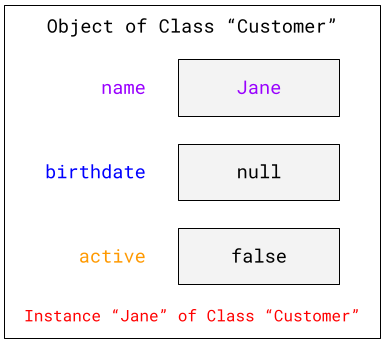
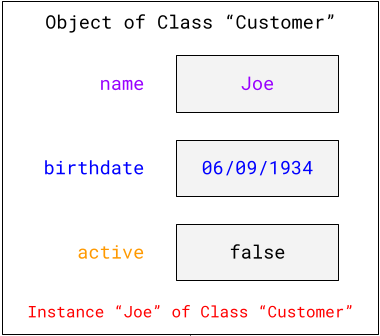
When you create an instance of a class, the attributes entered in the constructor will take the corresponding values and save them to the memory:
new Customer("Jane");
// LocalDate.parse("06/09/1934") will return a LocalDate
// object representing the date string "06/09/1934"
new Customer("Joe", LocalDate.parse("06/09/1934"));
Reference
To be able to access an instance from the memory, you need to link to it: this link is called a reference.
In Java, think of this like assigning the instance to a variable, which will determine the type of class for the object. Here is an example:
Customer joe = new Customer("Joe", LocalDate.parse("06/09/1934"));
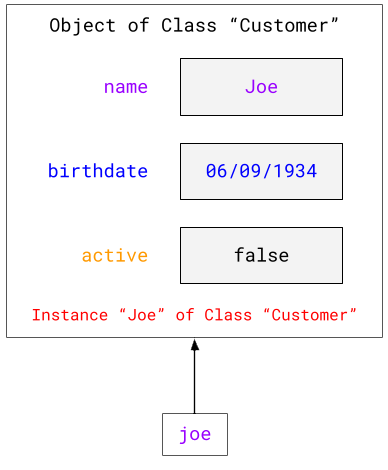
Here joe is the reference for this instance of the Customer class.
Since an instance is stored in the memory, it is possible to have several references that point to the same instance:
Customer joe = new Customer("Joe", LocalDate.parse("06/09/1934"))
Customer mrX = joe;
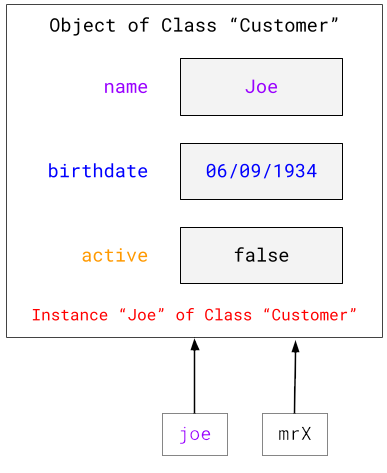
Here, joe and mrX represent two references that link to the same instance. In other words, if one of the two is modified, the other will change as well!
👉Getter and Setter
Getter
After creating an instance of an object, it may be useful to retrieve the value of one of these attributes.
Let's create a new customer named "AverageJoe" using the constructor Customer(String name, LocalDate birthdate), and initialize its attribute birthdate to the value today 23 years before.
Customer averageJoe = new Customer("AverageJoe", LocalDate.now().minusYears(23));
If you want to retrieve the value of its birthdate attribute, you will need to access its attribute.
You might be tempted to get it back by typing this:
Customer averageJoe = new Customer("Joe", LocalDate.now().minusYears(23));
// returns an error: age has private access in Customer
LocalDate birthdate = averageJoe.birthdate;
Conventionally, attributes should be assigned private accessibility. Meaning it is impossible to modify them from outside the class!
A class is a bit like a person. If you want to know their name, you're going to have to ask them, you're not going to search through their brain for that information!
The class is responsible for sharing and updating the status of its attributes.
This means we need to create getters for each attribute that the class should allow access. A getter, looks like this:
public typeAttribute getAttribute() {
    return this.attribute;
}
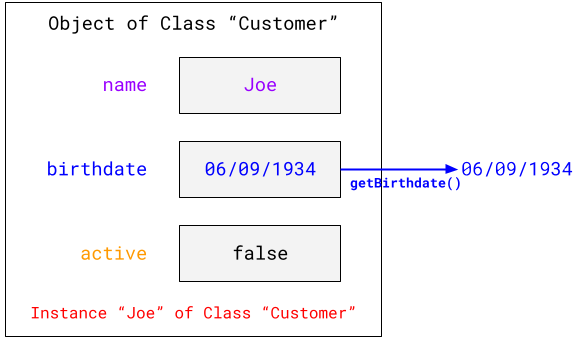
In this case, it is possible to retrieve the birthdate by using the following getter:
public LocalDate getBirthdate() {
    return this.birthdate;
}
Then simply call the getter like this:
Customer joe = new Customer("Joe", LocalDate.now().minusYears(23));
LocalDate birthdate = joe.getBirthdate();
Special rules for naming boolean getters
If the attribute is a boolean do not name the accessor getAttribute. Instead name it isAttribute:
public boolean isActive() {
    return this.active;
}
Setter
Similarly, if you want to change an attribute, you won’t be able to do this:
Customer jane = new Customer("Jane");
// error: birthdate has private access in Customer
jane.birthdate = LocalDate.now().minusYears(29);
Instead you will have to define setters like this:
public void setAttribute(typeAttribute attribute) {
    this.attribute = attribute;
}
Notice the use of the
voidtype for the above method. The setter will modify the state of the attribute, but it does not return any results!
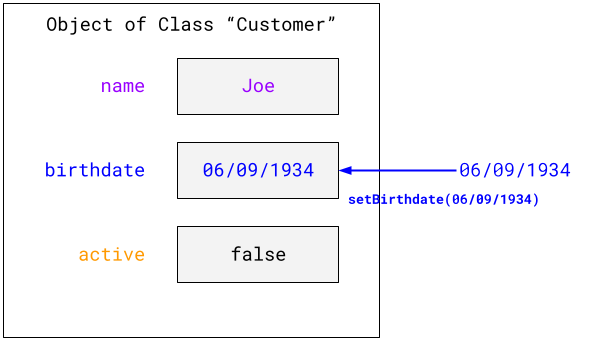
In this case, to modify the birthdate attribute write the following:
public void setBirthdate(LocalDate birthdate) {
    this.birthdate = birthdate;
}
It is now possible to modify this attribute using the following:
Customer jane = new Customer("Jane", LocalDate.now().minusYears(30));
jane.setBirthdate(LocalDate.now().minusYears(29));
🔬Exercise
Create a class Administrator which should represent a system administrator of a Web application.
An administrator should have these properties:
nameof typeStringemailof typeStringactiveof typeboolean
Steps
- Implement
name,email, andactiveas private attributes of the new classAdministrator. - Implement a constructor for
nameandemail, which sets the attributes to the parameter values andactiveto false. - Implement another constructor which take all three attributes as parameters and sets the attributes to the parameter values.
- Implement Getters and Setters for all attributes, note the different pattern for
booleantypes.
See solution|||java|||Reveal class Administrator with all Attributes, Constrcutors, Getters, and Setters|||0|||Hide solution
public class Administrator {

    private String name;
    private String email;
    private boolean active;

    public Administrator(String name, String email) {
        this.name = name;
        this.email = email;
    }

    public Administrator(String name, String email, boolean active) {
        this.name = name;
        this.email = email;
        this.active = active;
    }

    public String getName() {
        return name;
    }

    public void setName(String name) {
        this.name = name;
    }

    public String getEmail() {
        return email;
    }

    public void setEmail(String email) {
        this.email = email;
    }

    public boolean isActive() {
        return active;
    }

    public void setActive(boolean active) {
        this.active = active;
    }

}
👉Methods
Your object contains states and ways to access and modify them. However, an object can also have behaviors. In Java, these are called methods.
Instantiating methods
A method will allow you to carry out actions and return the result. A method is performed on the instance of a class, and its result will vary depending on the object on which it is performed.
You already know how to write your own methods and you’ve even had the opportunity to see them in action with getters and setters. However, one more example won't hurt you:
    public String nameAndAge() {
        return "My name is" + this.getName() + " and I'm " + String.valueOf(this.getAge());
    }
The method is called on the instance of the object, i.e. :
    Customer jane = new Customer("Jane");
    jane.buy("CrazyBlueDress"); // My name is Jane and I'm buying the CrazyBlueDress.
🔬Exercise
Extends the class Administrator for a method checkIfActive() which returns a String I am NAME and I am currently ACTIVE where NAME is attribute name and ACTIVE is attribute active.
See solution|||java|||Reveal class Administrator with the method checkIfActive()|||0|||Hide solution
public class Administrator {

    // omitted the attributes, getters, setters, and constructors here for brevity.

    // possible if-then-else solution
    public String checkIfActive() {
        if (this.active) {
            return "I am " + this.name + " and I am currently active";
        } else {
            return "I am " + this.name + " and I am currently inactive";
        }
    }


    // shorter solution with ternary operator
    public String checkIfActive() {
        return "I am " + this.name + " and I am currently " + ((this.active) ? "active" : "inactive");
    }

}
Static method
You have already had the opportunity to use a main() method, so you may have noticed the keyword static. It allows you to indicate that your method should be called directly on a class, and not on the instance of a class.
A static method does not allow you to recover the state of your object. In other words, it will be impossible for you to display or modify the attributes of the class using a static method.
public static String sayWhatYouAre() {
    return "I am a Customer, I am King!";
}
You can call the method on the class:
Customer.sayWhatYouAre(); // King!
A static method is useful if a single behaviour applies to all objects of a class.
☝️Summary
In this quest, you learned how to...
- Create a class instance
- Create a reference to this instance
- Retrieve an attribute with a getter
- Modify the state of an attribute with a setter
- Call a method on an instance of a class
- Call a static method on the class
- Reference the same instance twice, and understand the impact of the changing of the second one
💪Challenge
This will be a Quizz challenge.
References
- Photo by Michael Dziedzic on Unsplash